|
MyGaDOE |
Version 1.0 |
To view your MyGaDOE account information, complete the following steps:
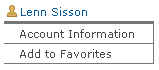
From any page in MyGaDOE, click the Account Information link in the personal section of the Navigation menu. A part of this menu is shown in the image below.
An example of the Personal section of the Navigation menu
You may view the account information (an example of which is shown in the image below), but you may not change it.

The View Account Information page
This completes the View Account Information task.